
IT Security on Unmanaged Devices
Control your business data on any device with Zero Trust as the cornerstone of your security
Empower Bring Your Own (unmanaged) Device
If there’s one struggle IT faces it’s the rise in the use of BYO and unmanaged devices. On the one hand, letting employees and contractors bring their own device for work can go a long way in reducing costs and simplifying IT. But at the same time, IT has to ensure company data isn’t compromised. And while corporate-owned devices can be closely monitored, a lack of insight into the health of unmanaged devices creates a significant risk.

PROS and CONS of BYOD
There are a variety of pros and cons to a BYOD model for both employers and employees. Some of the benefits include:
Increases in productivity over a 40-hour workweek
Enhanced employee job satisfaction and retention through flexible work arrangements
Greater employee effectiveness due to more comfort and speed with their own devices
- Lack of a centralized, accessible network
- Data breaches or gaps in network security
- Increased IT costs to support personal devices
Use Cases in Need for BYOD
There are many situations where a worker might need to access a company network on a device that is not owned and managed by the company. Freelancers and consultants may use their own PC’s and need remote access to a company’s IT resource. Other cases include:

Secure 3rd party/non-employee identities working inside the corporate network
Most enterprises support employees on the corporate network. However, it’s inevitable that other users, such as 3rd-party business partners, will also work from within your corporate network. These situations spotlight the true reason why location-based security tools are woefully overrated and why security should be uniform across the board.
When bringing non-employees or 3rd parties into a corporate network, you should utilize the Zero Trust philosophy of “trust no-one outside or inside the network.” If the only security you have is at the network layer, granting 3rd-party access creates a giant security risk. However, if “identity is the new firewall,” it’s important to make sure each identity (user) inside or outside the network only has the access they need, this to ensure the access to company resources remains secure. Read more

Protect remote workers accessing public and private (cloud) resources
Managing the security of remote employees has been a major concern in the wake of the COVID-19 pandemic.
Security administrators are finding their edge security products provide no benefit to remote workers who use the internet to connect directly to private cloud resources. While it is possible to force remote workers through the corporate network to use VPN or virtual desktop infrastructure technologies, these options often prove inefficient and burdensome. Zero Trust becomes a great alternative because it does not require users to connect to the corporate network before accessing services. Read more

Accessing OT management or control stations from the IT environment
OT (Operational Technology) environments are mostly operated by management stations controlling multiple industrial devices, Programmable Logic Controllers (PLC’s) etc. These OT environments have a high demand for real-time operation. This requirement will mostly stand in the way of a decent security design. The resulting design is mostly a strict separation between OT and the IT environment. Port based bridges (firewalls) are created to enable access to this environment, with all the additional needed monitoring as a requirement to this approach.
Soliton’s G/On will enable you to only allow the securely verified user to setup a connection to these OT management stations. All other connections are no longer needed or allowed. Resulting in a far lower amount of time spend on monitoring these sessions. Read more
Soliton's Enterprise Access Solutions
Soliton’s Enterprise Access solutions are about securely enabling applications on unmanaged remote devices to access company internal applications and services. Our security model is built on the assumption: “The enemy knows the system” and assumes that the enemy will use targeted attacks.
The central services are protected inside a security perimeter, and can only be accessed through a gateway. Whereas the gateway will only present the allowed applications to the verified user with a per user dynamically generated menu.
Learn more about Soliton’s enterprise access solutions for unmanaged devices:

To fully tap into the potential of BYOD, just control business data on unmanaged devices!
(The Fear of Not) Being in Control
Understanding the security risks
Following are the most severe risks affecting unmanaged and BYO devices.
Data Leakage and Loss
When employees use personal devices at work, any access to the corporate network can pose a risk. Attackers can gain access to a lost or stolen device or compromise a device via phishing or malware. At that point, attackers have three main options to do damage:
- Steal data stored locally on the device
- Use credentials stored on the device to access the corporate network
- Destroy data on the device
Mixing Personal and Business Use
It is inevitable that employees will perform both work and personal tasks on their personal device. Your organization won’t have control over websites visited by employees or that they use unsecured wireless networks to connect —the list of potential threats is endless.
Device Infection
Smartphones are commonly infected by malware, and in most cases, smartphone users are not aware their phone is infected. Another threat is that users often install questionable applications.
Compliance and certifications
Privacy and data sovereignty laws introduced common frameworks to manage and monitor compliance for a range of IT regulations and standards.
A growing number of the devices interacting with your data cannot be fully managed. But unmanaged and BYO devices shouldn’t mean increased risk
Your Data - Your Control
An increasingly diverse workforce of employees, partners, contractors, and other third parties coupled with unmanaged and BYO devices creates an additional security gap. Personal devices are typically unmanaged because the employee doesn’t want their organization monitoring their private device. Only with visibility into the use of your data on unmanaged and BYO devices will you avoid exposing your organization to unknown risks and close the security gap.
From its early beginning, Soliton’s enterprise access solutions are designed with Zero Trust in mind:
- Identity centric, no device authentication
- Authentication before access using Digital Certificates
- The principle of least privilege
- All data is segregated in an encrypted and secure area. End-to-end encryption is the standard for protecting communication
- Embedded 2-factor authentication
- No endpoint checking required – policies built-in solution
Rapid implementation & deployment
- Single app deployment
- Easy client certificate self-enrolment
- Supports ANY device policy
- Build for redundancy and load balancing
- Endpoint VPN can be immediately eliminated
- Enforces network segmentation
- Implements access control
Scalable without complexity
- No installation and no configuration required, no elevated rights to run
- Client application thus Agentless
- Add extra gateways in minutes
- Built-in load balancing and redundancy
- Field enrolment for fast user onboarding
- Organisations can scale up remote working in minutes rather than weeks — scaling just comes down to licencing
Easy
- No policies needed
- Boosts productivity with continuous verification of all users
- Re-establishes sessions for stable connection
- Unified user experience independent of used OS
- Eliminate the human element of cyber security
- Take out complexity, minimum staff required
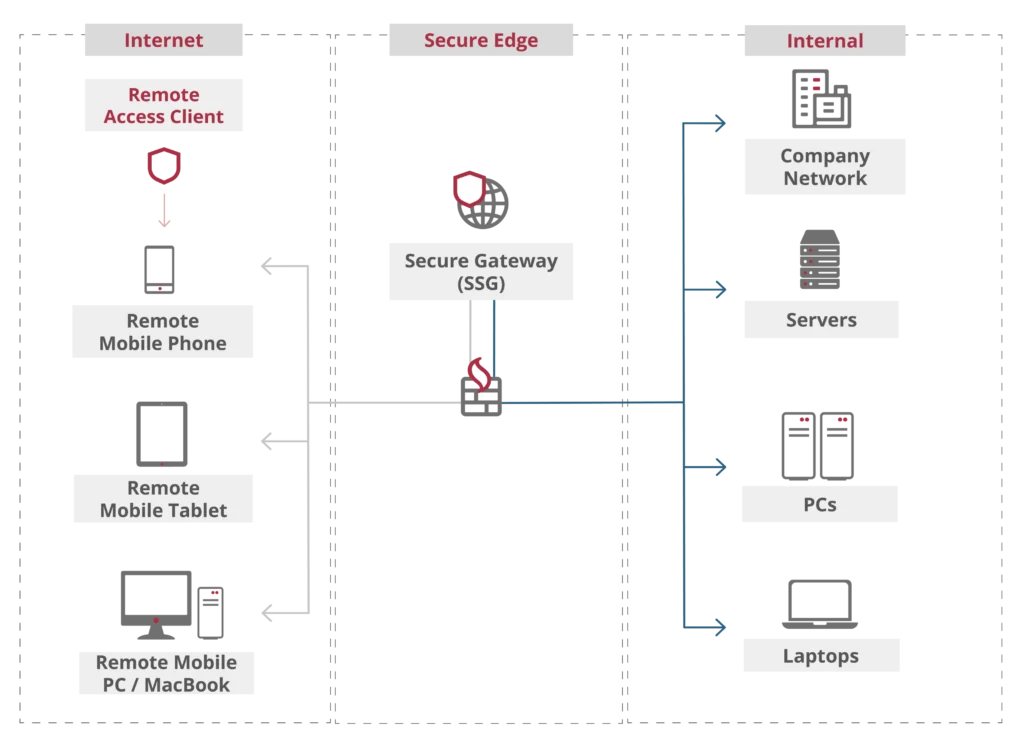
Soliton's Enterprise Access - The Technical View of It
- Mutual authentication between client and gateway creating a secure connection
- Gateway protects the servers and the network from cyber-attacks and from unauthorised access
- Gateway separates the client from the network, the remote device is never part of the network
- Gateway exchanges information with the network and enables secure access to the network resources
- Remote access client can be installed by end-user
- User access is based on permission rules or Active Directory group membership
Simplify your security - surpass VPN
It seems that many businesses are confident in providing secure access for their remote workers, but are still relying on inherently insecure solutions such as Virtual Private Networks (VPNs).
VPNs are part of a security strategy based on the notion of a network perimeter; trusted employees are on the inside and untrusted employees are on the outside. VPN is good for internal employees who need to access the server from anywhere besides the office. However, there are a number of concerns and vulnerabilities when it comes to deploying VPN.
An alternative to VPN is “Zero Trust ” where nothing is trusted, unless it can prove explicit identification of who it is each time it connects. Explicit identification means a stringent 2-way authentication.
Concerns & vulnerabilities when deploying VPN
- Both VPN access gateway and VPN endpoint client requires the need for additional vulnerability management
- The VPN configuration on the endpoint require elevated rights
- VPN is a remote network connection and gives continuous remote access to the company network to a device that is potentially not managed by the IT department
- VPN does not manage or secure the applications or data transfer, nor does it block malware or viruses from coming onto the network
- By default VPN does not support 2-factor authentication
Soliton's security layer
Remote workers take the freedom to process data in the way they like. They edit files, forward them to others and make screen-prints of sensitive information. Because you never know how safe the endpoint is, Soliton always implements a security layer around the work process of the end-user.
All company applications and data are segregated, users simply access the resources through the client app installed on their private device. The connection is always encrypted with strong mutual authentication, remote workers can connect to any Wi-Fi, only this time, risks are limited to a minimum. By applying the extra security layer the end-user and IT admin will have no fear of being at risk and allows employees to use any type of device and any type of internet connection.
Eliminate the need for MDM
A great benefit of this approach is that it eliminates Mobile Device Management (MDM). If you’re unsure about the best strategy to enable secure remote working, our white paper may be an interesting read.