


Network Access Control
What is Netattest EPS?
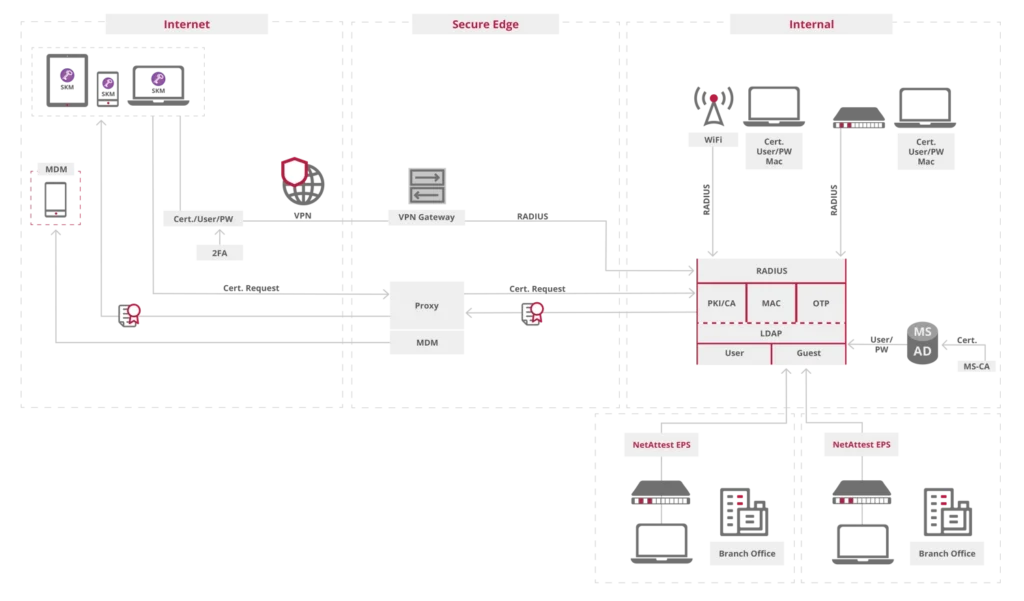
NetAttest EPS is a complete network access solution and uses the IEEE 802.1X standard to act as an authentication and authorisation server. It allows only authorized users to gain access, ideal for protecting both large and small networks, in one location or many, and it protects wired networks, Wi-Fi and VPN from unauthorized access from inside or out.
All-in-One-solution
Everything you need for a complete Network Access Control solution, in a self-contained solution. It’s vendor-agnostic and easily integrates with almost all third-party LAN products.
Wi-Fi User Access Control
NetAttest EPS protects Wi-Fi's from external hackers. Guests, temporary employees or contractors can use the self-service portal to request temporary access to the Wi-Fi.
Full Redundancy
Ensure high resilience with redundant NetAttest EPS setups, with up to 4 failovers. The configuration is remarkably straightforward, enabling potential for zero downtime.
Certificate Authority
With a built in Certificate Authority solution, issuing trusted digital certificates are easy, ensuring secure access, encryption, and seamless policy enforcement.
MAC address authentication
NetAttest EPS provides a dedicated database for MAC addresses to simplify the process of managing non-802.1X devices over all network medium types.
Consultancy & Deployment
Ensuring best-practice NAC control across a diverse range of devices and users can be complex to install and manage. Soliton's expertise is here to guide and support.
The synergy between IEEE 802.1X based on a RADIUS server combined with secure digital certificates, forms the backbone of effective Network Access Control (NAC) solutions. Soliton’s NetAttest EPS leverages this powerful combination, providing organizations with an all-in-one port-based network access control solution. NetAttest EPS enables seamless device authentication and certificate-based security, ensuring that only trusted devices and users can access the network. It can be offered as a hardware platform on site, or it can be hosted on Azure or AWS.
IEE 801.1X
What is IEEE 802.1X ? It is a robust network access control standard that enhances computer network security. It utilizes port-based authentication, allowing organizations to control network access by authenticating connecting devices. The protocol involves an authentication RADIUS server, a supplicant (client device) that utilizes digital certificates to authenticate themselves , and an authenticator (hardware platform or hosted service), ensuring only authorized users and devices gain network access, thus preventing unauthorized entry and enhancing network security.
Digital Certificates
Digital certificates play a pivotal role in the authentication process of IEEE 802.1X. These electronic documents verify the legitimacy of devices and users attempting to connect to the network. Unlike traditional username/password methods, digital certificates offer a higher level of security. They utilize cryptographic keys to establish a secure and trusted communication channel between the client and the authentication server. To further enhance network security, the implementation of digital certificates in IEEE 802.1X allows for the automation of credential verification, significantly reducing the risk of human error and credential theft.
RADIUS Server
A RADIUS server is a network service that authenticates and authorizes users wishing to access network resources, including LAN network port connections, VPNs, and Wi-Fi. It utilizes a protocol to verify the user’s credentials or certificate against a central database. The NetAttest EPS combines RADIUS and digital certificates to offer an off-the-shelf network access control system that provides enhanced security. This integration ensures a seamless and robust authentication process, significantly reducing vulnerabilities and streamlining access management across various network entry points.
NetAttest EPS Advantage
With NetAttest EPS, organizations can create a secure environment by implementing IEEE 802.1X-based authentication and leveraging the advanced security features of digital certificates. This solution offers a comprehensive approach to network access control, mitigating security risks and unauthorized access attempts. The integration of IEEE 802.1X and digital certificates in Soliton’s NetAttest EPS reflects a commitment to providing cutting-edge solutions for organizations seeking robust and reliable network security.
Key features
Effortless Certificate Administration
Soliton KeyManager app makes it easy for network administrators to use short-life certificates for enhanced security. The application offers a user-self-service to request and install user and device certificates automatically on any device in just three steps.
The Soliton KeyManager app warns the user if a certificate is about to expire. The user can follow a few easy steps to automatically renew the certificate if that is allowed.
Three Principles of Network Access Control
IT managers today face a great challenge. The new reality is that not everyone is accessing a network from the same controlled ecosystem. Increasing employee mobility, a rising number of BYOD devices, and the need to support hybrid work environments has greatly increased our reliance on network security in order to prevent cyber- attacks. IT admins are forced to review the security perimeter.
Authentication
User is prompted for credentials and identity verification (Who are you? Can you prove you are who you say you are?)
Authorisation
System confirms or denies based on the access policies (What network are you authorized to access?)
Accounting
System tracks user activities (What are you doing, and for how long?)
The ultimate goal is an environment where users can access resources with a frictionless experience that does not compromise IT efficiency, security or compliance.
SOLITON NETATTEST EPS
Addressing the Needs of Modern Organisations
Easy to use, easy to implement network access control
KEY BENEFITS
A Foundation for Your Network Security
The majority of breaches and data theft occur behind firewalls, making NAC a critical component of a multilayered security policy. But organizations need to understand that NAC is not a silver bullet that can protect their network against all types of threats, rather it should be used along with other systems to ensure complete network access protection. It doesn’t take the place of a firewall and won’t protect against data leaving through e-mail, printouts, or USB flash drives.
Nevertheless, NAC is more than a security solution; it helps you create a productive working environment for your team and create an impressive, seamless experience for your guests. It is your first line of defence of IT Security.
Netattest EPS Technical Specifications
Specifications NetAttest EPS
1. NetAttest EPS specifications
Feature | EPS-ST06A-A | EPS-DX05A-A | |
| General | Client certificates | 100 – 5,000 | 100 – 100,000 |
| Max. number of RADIUS clients | Unlimited (please select the best model according to your environment, such as system load) | ||
| Supporting authentication protocol | EAP-TLS, EAP-MD5, EAP-PEAP (MS-CHAPv2, GTC), EAP TTLS (PAP, CHAP, MS-CHAP, MS-CHAPv2), PAP, CHAP, MS-CHAP, MS-CHAPv2 | ||
| Redundancy |
|
| |
| RADIUS extension | One Time Password |
|
|
| MAC address authentication |
|
| |
| Group profile |
|
| |
| Certificate Authority (CA) | Issue external server certificate |
|
|
| Max. number of certificates | 20,000 | 400,000 | |
| Extended CA function |
|
| |
| External database | Windows Domain |
|
|
| External LDAP database |
|
| |
| RADIUS proxy |
|
| |
| Log manage- ment | RADIUS accounting |
|
|
| Log maintenance |
|
| |
| Other | SNMP (agent), NTP synchronisation, Syslog (TCP/UDP), Support UPS | ||
2. Physical appliance
| EPS-ST06A-A | EPS-DX05A-A | |
| Form Factor | EIA19 inch (incl. rack mount kit) | |
| Dimensions (W x D x H) | 438 x 44 x 292 mm | 443 x 44 x 386 mm |
| Weight | 3.3 kg | 7.3 kg |
| Network interface | 10/100/1000BASE-T(X) Auto recognition & Auto-MDI-X x 4 ports | |
| Power supply | 90 ~ 264VAC, 47 ~ 63Hz | 90 ~ 264VAC, 47 ~ 63Hz |
| Max. power consumption | 40 VA | 120 VA |
| Calorific value | 136.4BTU/h | 409.2BTU/h 103.1kcal 120W |
| Operating environment | Temperature 0 ~ 40°C Humidity 10 ~ 90%RH non-condensing | Temperature 0 ~ 40°C Humidity 20 ~ 90% non-condensing |
| Certifications | VCCI (Class A) FCC (Class A) CE, UL, RoHS | |
3. Virtual appliance
| EPS-ST06A-V | EPS-DX05A-V | |
|---|---|---|
| Supporting virtual platform | VMware ESXi 8.0 | |
| VMware virtual machine version | 13 | |
| Virtual machine image | OVA (VMWare ESXi) / Installer (Hyper-V) | |
| Number of CPU | 4 (Nutanix AHV: Number of CPU 1, Number of CPU Core 4) | |
| Memory size | 8,192 MB | |
| HDD 1 | 4GB | |
| HDD 2 | – | 96GB |
| Network adapter | 4 | |
- Supports redundancy with virtual and physical appliance.
- No support for displacement by using virtual platform function such as vMotion and VMwareFT (use the NetAttest EPS redundancy function)
- Support back-up/restore between virtual and physical appliance
4. Infrastructure
5. Client Specifications
Key specifications Soliton KeyManager
Platform: Windows
Operating system version: Windows 11 (Except on ARM)
Platform: Mac OS
Operating system version: 26 / 15 / 14
* From macOS 11 or later, manual installing downloaded mobileconfig to [Setting] – [Profile] is required.
* From macOS 13 or later, using the “Keychain Access” application to enable TLS trust for installed CA certificates is required.
Platform: iOS
Operating system version: 26.5-26.0 / 18.7-18.0 / 17.7-17.0
Platform: iPadOS
Operating system version: 26.5-26.0 / 18.7-18.0 / 17.7-17.0
Platform: Android
Operating system version: 16.0 / 15.0 / 14.0 / 13.0