It is an obvious fact that mobile devices are central to modern business operations. But giving employees and contractors secure access to sensitive corporate data on their smartphones introduces a real challenge. As organizations adopt Bring Your Own Device (BYOD) policies on top of MDM solutions, many find themselves comparing Microsoft Intune with Soliton MailZen. Both solutions aim to safeguard corporate information, yet the way they approach security and the practical experience for users differs significantly.
The Limitations of Traditional OS-Level Control
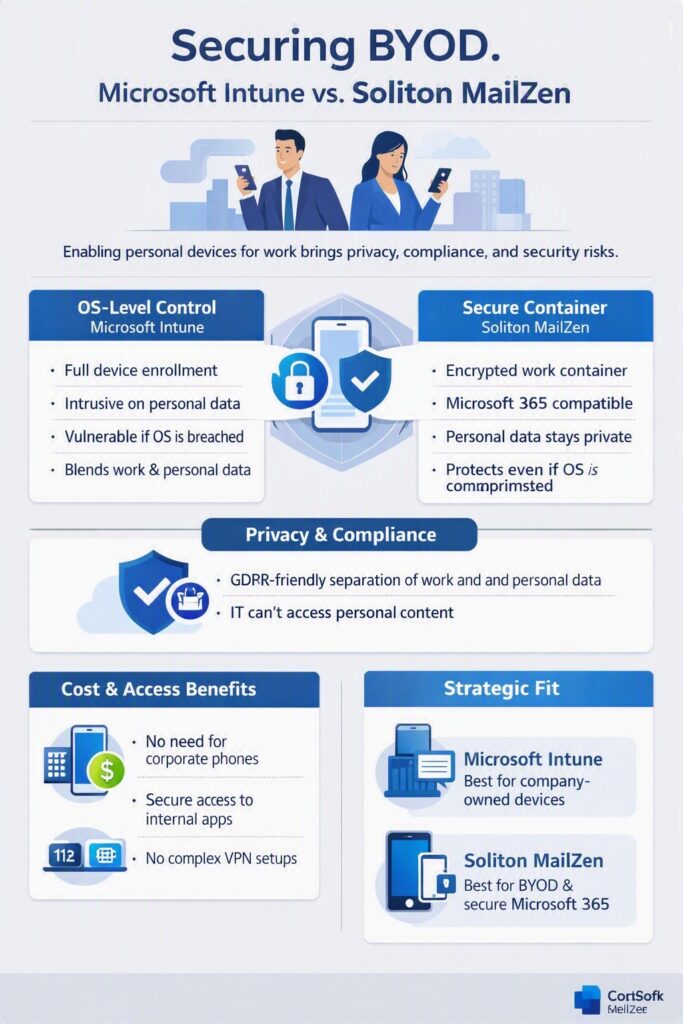
Microsoft Intune is a powerful management platform, tightly integrated with the Microsoft 365 ecosystem. It excels at enforcing hardware policies, distributing applications, and maintaining control across large fleets of devices. But Intune’s strength is also its constraint – it operates at the operating system level. To apply meaningful security controls on personal devices, organizations must enrol those devices into full management. For many employees, contractors, and volunteers, this level of oversight feels intrusive, especially when they want to keep personal data completely separate from work.
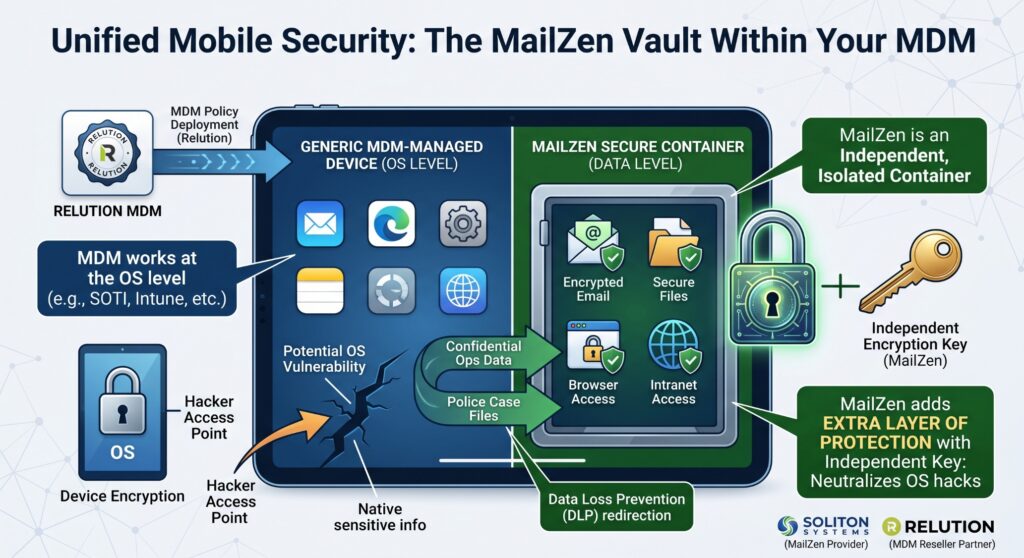
This OS‑level dependency also introduces a deeper security concern. If an attacker compromises the device’s operating system, whether through a zero‑day exploit or sophisticated malware, Intune’s protections can be bypassed. Once the OS is breached, any corporate data stored natively on the device becomes vulnerable.
The Secure Container Advantage and Microsoft 365 Compatibility
Soliton MailZen takes a fundamentally different approach. Instead of relying on the operating system, it creates a secure, encrypted container that isolates corporate resources from the rest of the device. Importantly, MailZen is fully compatible with Microsoft 365, allowing users to access Exchange Online, Outlook, Teams, and other services without mixing personal and business environments.
This container acts as a self‑contained vault, operating independently from the device’s OS. Corporate emails, files, and internal applications remain sealed off from personal apps and data. Even in a worst‑case scenario where the operating system is compromised, the MailZen workspace remains protected – its contents inaccessible to unauthorized actors.
Privacy Compliance and Ease of Deployment
Privacy regulations such as GDPR add another layer of complexity for organizations using traditional management platforms. Because Intune’s policies can inadvertently blend personal and business data, maintaining strict compliance can be difficult. MailZen avoids this entirely by enforcing complete separation. IT administrators never gain visibility into personal photos, messages, or apps.
This separation also simplifies deployment. Enrolling personal devices into a full management system often requires hands‑on IT support and troubleshooting. MailZen, by contrast, offers a lightweight installation process that users can complete themselves in minutes.
Cost Considerations and Advanced Access
Managing BYOD devices through Intune typically requires organizations to subscribe to higher‑tier enterprise plans. MailZen provides a cost‑effective alternative, enabling secure BYOD programs without forcing companies to purchase dedicated corporate phones for every staff member.
Beyond email, MailZen includes a secure browser and supports direct access to internal on‑premise applications through a secure gateway. This eliminates the need for complex VPN setups and gives users a seamless, protected way to reach critical systems.
Strategic Implementation
For organizations that issue only corporate‑owned hardware and require broad device management, Intune remains a strong and capable solution. But for businesses embracing BYOD, MailZen offers a more balanced approach including stronger data protection, strict privacy separation, and minimal IT overhead. Companies handling highly sensitive information can confidently deploy MailZen to secure Microsoft 365 access on personal devices or run it alongside an existing management platform as a dedicated secure vault for critical communications.
MailZen functions as an isolated vault located directly on the mobile device, operating independently of the underlying OS. Corporate communications, internal files, and proprietary applications remain strictly segregated from personal applications. This architecture ensures that even if the device OS is compromised, data within the MailZen workspace remains protected and inaccessible to unauthorized external actors.
Privacy Compliance and Ease of Deployment
Navigating privacy regulations like GDPR is complex when utilizing standard management platforms. Because Intune can mix business and personal data depending on policy configurations, establishing strict EU compliance is challenging. MailZen eliminates this risk by ensuring full separation; the IT department never gains access to personal photos or private applications.
This separation also streamlines the onboarding process. Enrolling personal devices into a full management framework often requires heavy IT involvement and troubleshooting. MailZen offers a straightforward installation process that users can easily complete themselves without technical assistance.
Cost Considerations and Advanced Access
Microsoft Intune requires organizations to subscribe to premium enterprise plans to manage external BYOD hardware effectively. MailZen provides a highly cost-effective alternative. By securely enabling BYOD programs, organizations can eliminate the significant capital expenditure of purchasing dedicated corporate phones for all staff members.
Additionally, MailZen extends beyond basic email functionality. The solution includes a secure browser and provides direct access to internal on-premise applications via a secure gateway, entirely removing the need for complex VPN configurations.
Strategic Implementation
For organizations that exclusively issue corporate-owned hardware and require broad hardware management, Intune remains a capable tool. However, for businesses utilizing a BYOD model, Soliton MailZen delivers strong data protection, strict privacy separation, and minimal IT overhead. Organizations managing highly sensitive information can confidently deploy MailZen to secure their Microsoft 365 environments on personal devices, or run it alongside an existing management platform to serve as the ultimate secure vault for all critical communications.